LESCO Bill Check Online 2026 – Check & Download Duplicate Bill
🌟 Check Your LESCO Bill🌟
Haven’t received your 2026 LESCO bill yet? Getting your electricity bill late every month? Or want to check your duplicate LESCO bill details before the physical copy arrives?
With the Lahore Electric Supply Company (LESCO) eBill service, you can easily check your LESCO Bill Online 2026 for free. There’s no need to wait for the printed bill anymore. The LESCO eBill facility allows you to view and download a duplicate copy of your bill anytime, even before it is delivered to your home.
Simply open the LESCO eBill portal and enter your reference number or Customer ID to access your duplicate bill instantly. You can view it online, download a PDF copy, or even take a screenshot for your records. The process for checking your LESCO bill (lesco bill check karne ka tarika) is quick, simple, and user-friendly.
You can also check your GEPCO Bill online for free through the official portal of Gujranwala Electric Power Company (GEPCO). Click to access the GEPCO Bill service.
⚠️ This is an independent website and not affiliated with LESCO.
LESCO Bill Online Check 2026 – Download Duplicate Bill
The reference number format has been updated. Customers must now enter their new reference number to check their bill online for free. The updated reference number is printed on your latest electricity bill.
You can easily view your duplicate bill, save a copy, or download it in PDF format for future use. All your Bijli bill details can be accessed from the saved or downloaded copy whenever needed.
If you have any questions or concerns regarding your electricity bill, please contact the relevant officials of Lahore Electric Supply Company (LESCO). This service is also commonly referred to as the LESCO WAPDA online bill.
how to check your DUPLICATE LESCO bill online for free
- Now you can check your electricity bill online for free. Simply enter your reference number {14-digit number} OR customer id {7-digit number} in the designated field and press Enter. Your bill will be generated instantly. By following this quick and easy process, you can view your bill anytime without waiting for a physical copy.You can also take a print out in a hard copy
- You can also access your duplicate WAPDA electricity bill through our website. The duplicate bill provides complete details, including the total amount due, units consumed, due date, taxes, and other applicable charges, making it easy to review all your billing information in one place..
HOW TO FIND CUSTOMER ID AND REFERNCE NUMBER
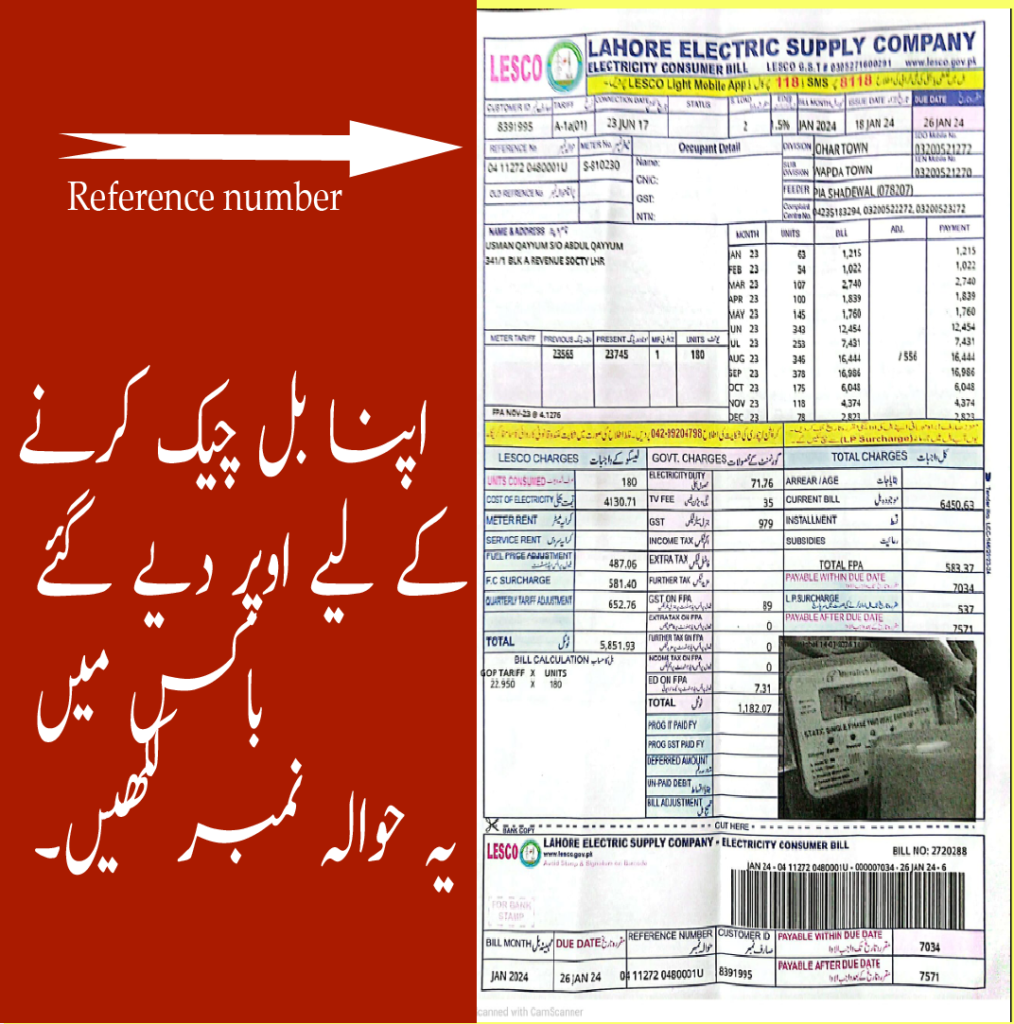
OLD BILLS
- To locate your reference number or Consumer ID, please check the top left corner of your previous electricity bill. Both numbers are printed separately and clearly labeled for your convenience.
Calling customer care service
- If you do not have a copy of your old bill or have misplaced it, there is no need to worry. You can contact your LESCO customer support for assistance in retrieving your reference number or Consumer ID.
online portal
- You can find your reference number or consumer id online b entering your id card number in "view bill" from here you can copy your reference number or consumer id to further find your ebill.
LESCO Bill Due Date & Late Payment
Why LESCO bill due date is important?
- Due date is the last date to pay your bills without extra charges or penalties.
- Paying your bill before or on the due date helps you avoid additional surcharges or late payment penalties.
- in some cases if you exceed too time after due date you will have the risk of connection cut or electricity disconnection.
Areas covered by LESCO
- Lahore
- Sheikhupura
- Kasur
- Okara
- Nankana
As LESCO was facing difficulties to maintain the supply for such vast areas which include rural and urban areas so they decided to divide their terittories into more divided parts called "circles".A circle comprises of various Divisions and subdivisions.
LESCO bill payment options
Paying your bill is easy—just follow the steps below:
- Easypaisa : You can easily pay your bill by easypasia app or by going to easypasia retailer shop.
- Bank : By using bank apps.
- Post-office : You can pay your bill via post-office using cash , cheque and bank drafts.
- LESCO service center: you can go to nearest customer care office to pay your bill .
- ATM : you just have to normally insert your credit/debit card then simply select "Pay bill" option then follow the process.
FOR MORE DETAILES STEPS VISIT [https://lescoebil.com/how-to-pay-bill/]
Lesco tarrif rates 2026
Tariff rates are the price you pay for electricity consumed per unit.
In a Lahore Electric Supply Company bill, tariff rates determine how much you are charged based on the number of units (kWh) you use.
“View full tariff details” → https://lescoebil.com/lesco-tariff-rates-2026/
TO UNDERSTAND TAXES VISIT OUR OTHER PAGE [https://lescoebil.com/lesco-bill-taxes-explained-2026/]
FAQ'S
Disclaimer
This website is an independent informational platform and is not affiliated with Lahore Electric Supply Company or any government organization.
We provide tools and information to help users check and understand their electricity bills. While we strive to keep all information accurate and up to date, we do not guarantee the completeness or accuracy of the data.
Users are advised to verify official information directly from the official LESCO website or relevant authorities.